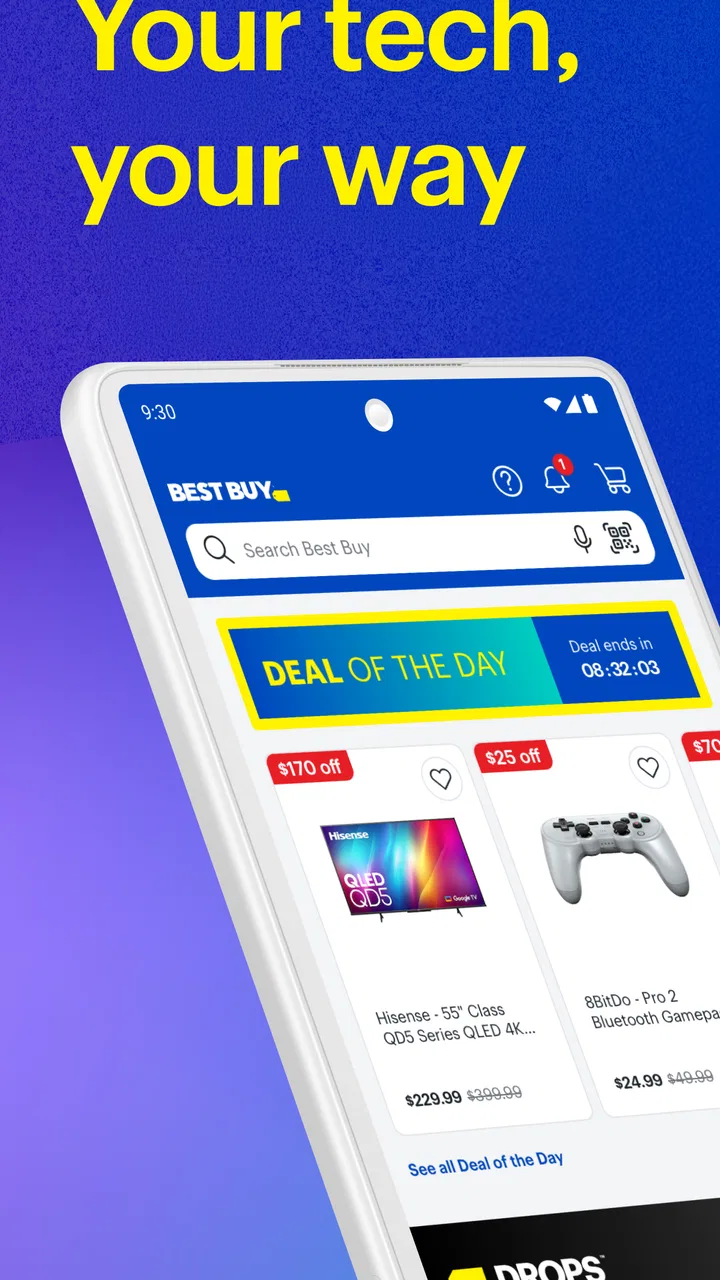
Best Buy: Shop tech deals
- 4.7
- Rating
- 10.00M
- Installs
- Free
- Price

 Analysis by App-foxy
Shopping for electronics on a phone sounds simple until you are comparing several televisions, checking whether a laptop fits your needs, or trying to decide if a sale is actually useful. I spent time using Best Buy: Shop tech deals as a mobile shopping app, and my impression is that it works best when you already have a clear idea of what you want. It brings Best Buy’s electronics catalog into a more convenient format, but the value is not just in scrolling through products. The real benefit is being able to narrow a purchase, inspect the important details, and continue the buying process without sitting at a computer.
This is a free shopping app from Best Buy Co., Inc., aimed at everyone rather than a specialist audience. It covers the kind of purchases people commonly make from Best Buy, including TVs, laptops and other electronics. The app has been available since February 8, 2010, and its current version is 26.2.10. It supports devices running Android 7.0 or later, which makes it accessible on many older Android phones as well as newer models.
Its reception is strong: the app holds a 4.7 average from around 425 thousand ratings, with roughly 80 thousand written reviews, and it has passed 10 million installs. Those figures suggest that it is a familiar tool for a large number of shoppers, although popularity does not remove the need to check details carefully before placing an order. In my experience, the app is most useful as a focused shopping workspace, not as a replacement for understanding the product itself.
You May Also Like

 Blood Strike: 2.5 Anniversary
Blood Strike’s Loadouts Turn Every Drop Into a Tactical Gamble
A close look at Blood Strike’s custom loadouts: how fast access to signature weapons reshapes its battle royale rhythm, rewards preparation, and narrows the gap between fights.

 Pandora - Music & Podcasts
Pandora’s Music Is Easy to Start, but Harder to Recover
Pandora’s strength is its low-effort path from a seed to a station. Its weak spot is how much confidence it asks you to place in connection, setup, and quiet recovery.

 8 Ball Pool
 Is Built on Rivalries, Rematches, and Routine
A close look at the rivalries, rematches, shared routines, and unanswered safety questions that turn a quick pool match into a persistent mobile community.

 Samsung Music
’s Quiet Strength Is Playing What You Already Own
Its reach comes less from spectacle than from dependable access to a personal library. That simplicity is both the app’s strongest retention engine and its ceiling.

 AccuWeather: Weather Radar
AccuWeather Review: A Quick, Clear Forecast for Everyday Decisions
For everyday plans, the best forecast is the one you can understand quickly. AccuWeather makes rain timing, radar, and local conditions easy to act on, with a few trade-offs.

 Hill Climb Racing
Why Hill Climb Racing Still Turns Crashes Into One More Run
A tiny car, a bumpy hill and one more upgrade: Hill Climb Racing keeps resurfacing because its simple chaos makes every near-miss feel personal.
More From Our News Desk
View All News


Where shopping usually gets stuck
I find that electronics shopping most often gets stuck at the point where a broad need has to become a precise choice: a laptop for work, for instance, can mean very different things depending on the software and portability you need. In this section, I focus on how I turn an initial search into a shortlist without letting a promotion make the decision for me. Next, I look at the small preparation steps that make those comparisons more useful.
Finding a suitable product is easier than choosing between similar ones
The first thing I noticed is that the app can make a large catalog feel manageable, but it cannot make a complicated buying decision disappear. A search for a laptop, television or accessory may produce several models that look almost identical at first glance. The useful work begins after the initial search: comparing screen size, storage, connectivity, included accessories and other specifications that affect daily use.
I recommend starting with a short list of requirements before opening the app. For a laptop, I would decide whether portability, screen size, storage or performance matters most. For a television, I would settle on a size range and the room where it will be used. This prevents the sale section from steering the whole decision. A lower price is not automatically a better purchase if the model lacks a feature you will use every day.
One practical advantage is that mobile browsing lets me check products at the moment a need appears. If I am replacing a broken charger or comparing televisions while standing in a room, I can look at the available choices without switching to a desktop browser. The trade-off is that a phone screen encourages quick decisions. I found it important to pause on the full product information instead of judging from the first image and headline.
Deals can distract from the total buying decision
The app is clearly built around shopping and promotions, so sale messaging is part of the experience. That can be helpful when I am flexible about the model, but it is less helpful when I need a specific configuration. A discounted item may still be unsuitable because of its size, compatibility or missing feature.
My preferred approach is to search by need first and look at the deal afterward. I compare the exact model details, then consider whether the saving changes the decision. This is a small habit, but it avoids one of the most common mobile-shopping mistakes: treating a visible discount as the main reason to buy.
Another point worth remembering is that product information is easier to overlook on a small display. I read the description in sections rather than relying on the short summary. If the purchase involves compatibility, I check the existing equipment before ordering. This matters with cables, mounts, storage devices and computer accessories, where a product can look right but still fail to match what is already at home.
Account and checkout interruptions need a calm response
Shopping apps can feel frustrating when a session stops being smooth during sign-in, cart review or checkout. If the screen takes longer than expected, my first reaction is not to tap repeatedly. Repeated taps can make it unclear whether an item was added once or several times, or whether a checkout action has already been accepted.
I usually return to the cart and review it before trying again. I also check whether the selected product, quantity and delivery or collection choice are still present. This simple recovery step is more reliable than assuming the previous screen failed completely. It is especially useful when shopping from a weak mobile connection or while moving between networks.
The app is free to download, but that should not be confused with every purchase being free. The app is a shopping tool, so the important cost decision remains the product, along with any delivery or collection choices shown during the buying process. I treat the displayed total as the point to review carefully before confirming anything.
Setup checks that prevent avoidable trouble
Before shopping, I like to separate practical setup from product research: checking Android compatibility is one thing, while noting a television’s available space or an existing device’s model number is another. Both can prevent avoidable frustration, but they serve different purposes, so I cover how I prepare the phone and the information I need before browsing. From there, I turn to what I do when a session still goes off course.
Start with compatibility and a clean installation
On Android, the minimum requirement is version 7.0. If the app will not install or update, I would check the phone’s Android version before blaming the application. Older software can also create broader problems with modern shopping services, so updating the operating system where possible is a sensible first step.
I also recommend installing the app from the official app marketplace and allowing the installation to finish before opening it. If the first launch behaves strangely, closing and reopening the app is a reasonable basic check. I would avoid downloading modified packages from unofficial sources, particularly for a shopping app where account and payment activity may be involved.
A stable connection matters during the first use because product images, search results and account screens may load separately. If browsing works but checkout does not, I would switch between a reliable Wi-Fi connection and mobile data to see whether the problem follows the network. That test is more informative than immediately reinstalling the app.
Use the phone itself as part of the diagnosis
Before assuming the app is broken, I check available storage and whether other apps are behaving normally. A phone that is nearly full may struggle with updates or temporary files. I also close demanding apps if the device is older or running slowly. These are ordinary checks, but they often explain why an otherwise useful shopping app feels unresponsive.
If the app opens but a page does not refresh, I first leave that screen and return to it. If that does not help, I restart the app. Clearing temporary app data can be a later step on Android, but I would do it carefully because it may remove local session information and require signing in again. I would not clear data in the middle of an order unless I had already confirmed the order status elsewhere in the app.
The same principle applies to updates. The current version is 26.2.10, and keeping the app current can help with compatibility and stability. However, updating during an active purchase is poor timing. I prefer to finish or verify an order first, then update when I am not relying on the app for an immediate transaction.
Prepare information before comparing products
Setup is not only technical. A little preparation makes the app much more useful. I keep the model number of an existing device nearby when searching for a replacement, and I note the space available for a television or appliance. For computer purchases, I write down the programs I use and the storage I need. This turns browsing into a practical comparison instead of an endless stream of attractive products.
One of my more useful habits is to separate “must have” requirements from “nice to have” features. I then inspect each candidate against the first list before considering extras. This is particularly valuable in Best Buy’s wide electronics range, where a product can appear appealing because of one strong feature while being wrong for the rest of the setup.
Keep the shopping session recoverable
When I am researching an expensive item, I avoid depending on one uninterrupted session. I write down the exact model names or save my comparison notes outside the app. If the app closes, the phone restarts or I move to another device, I can continue without rebuilding the entire search from memory.
This is also a good way to distinguish research from purchasing. I may spend several sessions comparing products, then return later to make the final decision. That reduces pressure and makes it easier to notice whether I am choosing a product for its specifications or simply because it appeared prominently during a sale.
Recovering a workflow after something goes wrong
A stalled page or an uncertain cart can tempt me to repeat the same action, but that can make the situation harder to read. Here, I explain how I distinguish a connection or session problem from a product-specific issue, and how I verify the cart or order before trying again. Once that recovery approach is clear, I compare the app with other ways to shop for electronics.
When search results or product pages behave oddly
If search results seem incomplete, I try a more specific phrase and then a broader one. For example, I might search by product type first and refine by brand or key specification afterward. This helps reveal whether the issue is the wording of the search or a temporary loading problem.
I also look for consistency. If several unrelated product pages fail to load, the connection or app session may be responsible. If only one item behaves strangely, I treat that product page as the problem area and search for the model again rather than repeatedly refreshing the same screen.
Images can be useful, but I do not use them as proof of compatibility or included equipment. I read the written details and inspect the specifications. This is one of the most important differences between casual browsing and responsible electronics shopping: photographs often show a product in a complete setup even when the purchase concerns only one component.
When the cart does not look as expected
If an item appears to vanish, I repeat the search for the exact model before adding it again. It may have been a temporary display issue, or I may have selected a similar version. If the cart shows a duplicate, I remove the extra item and review the quantity before moving on.
For a larger purchase, I take a moment to confirm the selected size, color or configuration. Similar products can share much of the same wording, and mobile screens make small differences easy to miss. I would rather spend an extra minute checking the model identifier than discover after delivery that I ordered the wrong variant.
If checkout appears to freeze, I avoid pressing the final action several times. I check the cart and order area first. If the order is not visible, I restart the app and verify the account session before attempting another submission. If money has been involved or the status remains unclear, contacting Best Buy support through its official channels is safer than guessing.
When sign-in becomes the barrier
A failed sign-in does not necessarily mean the shopping catalog is unavailable. I can often continue researching without an account, while account-related actions may require returning to the sign-in step. I check that the email address and password are entered correctly, then consider whether the issue affects only this app or other services as well.
On a shared or borrowed phone, I am especially careful about account details. I sign out when appropriate and avoid saving sensitive information on a device that is not mine. The app is intended for everyday shopping, but account security still depends on basic habits outside the application.
If a password reset is needed, I use the official recovery route rather than third-party pages. I also avoid creating multiple accounts simply because one login attempt failed. That can make order history and future purchases harder to manage.
When the app is not the cause
Some apparent app problems are really product, inventory or fulfillment questions. A product may be available for browsing but not suitable for the selected delivery or collection method. A price or promotion may also depend on the exact item and the choices made later in the purchase process. I treat the final review screen as more important than an early promotional message.
Network conditions are another common culprit. A crowded public Wi-Fi connection can make an app appear broken even when other pages eventually load. Testing the same action on a dependable connection helps separate a service issue from a local one. If only the Best Buy app fails while other apps work, restarting it and checking for an update are reasonable next steps.
Phone settings can matter too. Aggressive battery management, restricted background activity or limited storage may interrupt an app session. I do not change those settings blindly, but I keep them in mind when the application repeatedly closes or loses progress. If the phone has similar trouble with several apps, the wider device environment deserves attention.
For an order that has already been submitted, I would not rely on a notification alone. I check the order area and any confirmation information available through the account. If the status is ambiguous, official customer support is the right place to resolve it. The app can organize the shopping process, but it cannot replace clear confirmation when an order or payment is in doubt.
How it compares with other ways to shop
The right shopping route depends on whether I want a focused Best Buy experience or a broad comparison across retailers. I weigh the app’s convenience for researching Best Buy electronics against the flexibility of a browser and the wider catalogs of general marketplaces, including where those alternatives make more sense. That comparison leads into who is likely to benefit from keeping the app and who can comfortably skip it.
Compared with a mobile browser
The main reason I would choose the app over a browser is convenience during repeated shopping sessions. An installed app feels more direct when I am checking several products, returning to a category or reviewing a cart. It is also a natural choice for someone who regularly shops Best Buy and wants the store experience close at hand.
A browser can be better when I am comparing Best Buy with several other retailers at the same time. Browser tabs make cross-store research more natural, and I do not need to install anything. If I am making a one-time purchase and want the broadest possible comparison, the browser may be the less committed option.
Compared with general marketplace apps
General marketplaces often offer a wider mix of sellers and product types. That can be useful for finding unusual accessories or comparing many brands, but it can also make seller information and product consistency more important to inspect. Best Buy’s focused electronics identity is more comfortable for shoppers who want to stay within a dedicated technology retailer.
The trade-off is variety. Someone looking for household goods, clothing and electronics in one cart may prefer a broad marketplace. Someone choosing a television, laptop or related technology purchase may appreciate a more focused catalog and a shopping flow built around those products.
Who should use it and who should skip it
I would recommend the app to people who frequently shop for electronics, compare Best Buy products from a phone, or want a convenient way to research a purchase before visiting a store or completing an order. It is also a sensible option for shoppers who already know the retailer and prefer a dedicated mobile experience.
I would skip it if I rarely buy technology and do not want another shopping app installed. I would also choose a browser or comparison-focused service if my priority is checking many retailers simultaneously rather than staying within Best Buy’s catalog. The app is not a substitute for independent research when the purchase is expensive or technically complicated.
For a realistic example, imagine that my television stops working before a weekend gathering. I can use the app to search by screen size, inspect several models and check the details from the room where the replacement will be used. The best workflow is not to grab the first discounted result. I would measure the available space, confirm the model information, review the purchase choices and only then decide whether the deal is worthwhile.
My practical verdict after using it
Best Buy: Shop tech deals is a capable, focused shopping app for electronics buyers who value convenience more than broad marketplace comparison. I like it most when I have a defined task: compare laptops, narrow down televisions, check an accessory or revisit a product I have already researched. Its free price and Everyone age rating make it approachable, while support for Android 7.0 or later keeps the technical entry point reasonable.
The strongest part of the experience is the ability to turn a phone into a practical product-research tool. The app helps me move from a general need to a shortlist, but the final quality of the purchase still depends on how carefully I read specifications and check compatibility. That is where many shoppers will either get real value from it or make an avoidable mistake.
Its limitations are mostly about context rather than a single missing function. Mobile screens can encourage rushed choices, promotions can distract from requirements, and a connection or account interruption can make checkout feel uncertain. None of those issues makes the app unusable, but they reward a deliberate workflow: prepare your requirements, verify the exact model, review the cart and confirm the order status without repeatedly tapping through a problem.
My recommendation is straightforward. If Best Buy is one of the places you already consider for technology purchases, I think the app is worth trying. Use it as a research and shopping companion, not as an automatic decision-maker. If you want to compare every retailer in one place or shop across many unrelated categories, a browser or broader marketplace may fit better. For focused electronics shopping on Android, though, this is a useful and accessible option that becomes noticeably better when you slow down and check the details.
Best Buy Co., Inc. has kept the app centered on its core shopping purpose, and that focus works in its favor. I would keep it installed for planned electronics purchases, especially when I need to compare models from the sofa, the office or the room where the product will be used. Just remember the most important rule I took away from using it: verify the exact product before trusting the deal.
FAQs for Best Buy: Shop tech deals
01What features does the Best Buy app offer?
The Best Buy app provides a seamless shopping experience with features like easy navigation, product search, and detailed product information. Users can access exclusive deals, track orders, and manage their accounts. Additionally, the app offers a barcode scanner for in-store price comparisons and supports mobile checkout options for convenience.
02How secure is the Best Buy app for online purchases?
Security is a top priority for the Best Buy app. It uses encryption to protect your personal and payment information during transactions. The app also supports secure login options, including biometric authentication like fingerprint and facial recognition, ensuring that your data and purchases remain safe.
03Can I earn and use Best Buy rewards through the app?
Yes, the Best Buy app integrates with the My Best Buy rewards program. You can earn points on eligible purchases, view your rewards balance, and use your rewards certificates directly from the app. This makes it easy to track and redeem your points for discounts on future purchases.
04Does the Best Buy app support price matching?
The Best Buy app offers a feature to check if an item qualifies for price matching. Users can submit a request directly through the app by providing proof of a lower price from a competitor. The app then processes these requests, making it convenient to ensure you get the best deal possible.
05Is customer support available through the Best Buy app?
Yes, customer support is readily accessible through the Best Buy app. Users can chat with support representatives, schedule in-store appointments, and access a comprehensive help center. These features ensure that you can quickly resolve any issues or questions regarding your purchases or app usage.
Pros
- User-friendly interface for quick navigation.
- Daily updates on exclusive tech deals.
- Price match guarantee for better savings.
- Comprehensive product reviews and ratings.
- Seamless integration with Best Buy accounts.
Cons
- Occasional app crashes during peak hours.
- Limited availability of certain products.
- In-app ads can be distracting.
- Some features require location access.
- Longer delivery times for certain areas.

Best Buy: Shop tech deals
Gallery